A Comparison of tf.data.Dataset with Manual Image Loading
Loading data for AI models can be RAM and time-intensive. For a larger project (HackAI 2025) with a big dataset, I ran an optimization test on a manual loader and a Tensorflow pipeline to see the variations in time and RAM. As expected, Tensorflow’s model is much more efficient.
While working on our HackAI 2025 project, we found that our original way of loading the image data for our multi-headed regression was incredibly slow, and was crashing some of our computers due to RAM usage. Eventually, we converted our pipeline over to one that utilizes the more-optimized tf.data.Dataset pipeline. For our own entertainment, we made plots comparing the old method with the new method.
We split up the data loading process into ten steps, which each print the current memory usage using psutil:
- The start of the process
- Reading the Kaggle CSV into a
DataFrame - Fetching the images and their values
- Shuffling and unzipping the values
- Creating the train/test/validation splits
- Normalizing the data
- Read in the train data
- Read in the validation data
- Read in the test data
- All images read and stored, process completed
We do this twice: once with our old method and once using tf.data.Dataset.from_tensor_slices. The first is with our old, direct method:
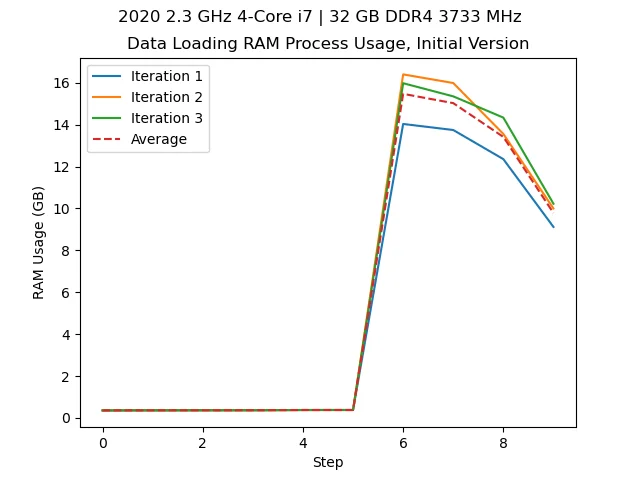
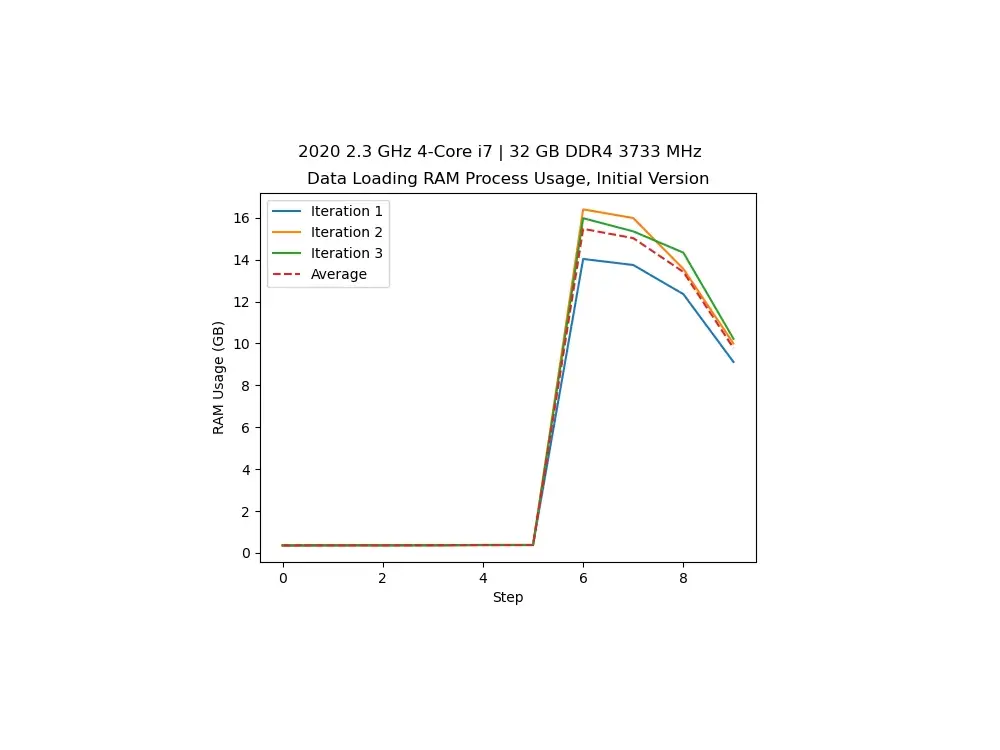
Loading our data with 32 GB of RAM on an Intel i7. We see we use over 16 GB.
We also track the time this process takes:
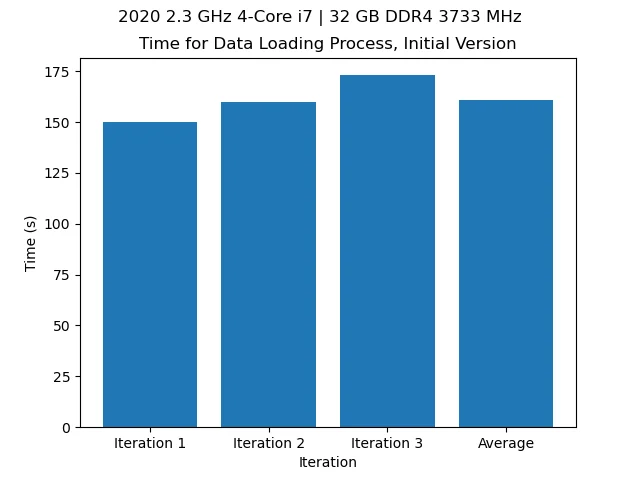
Time over a few iterations of loading the data with the old model (~2min 40s).
Utilizing the Tensorflow optimizations, we get:
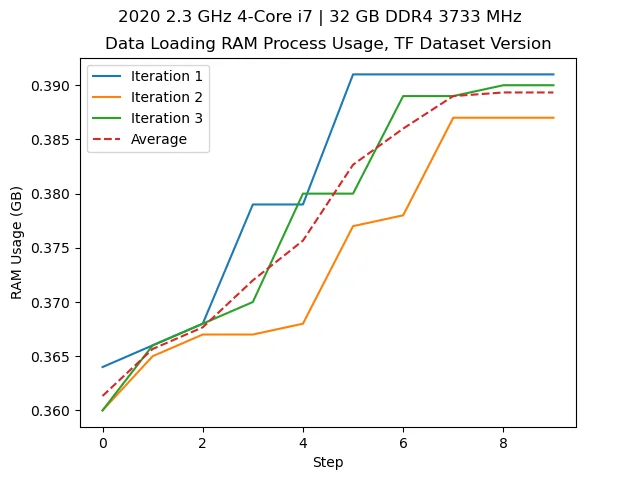
With the new process, shown above, we don’t even use 0.5 GB loading the data.
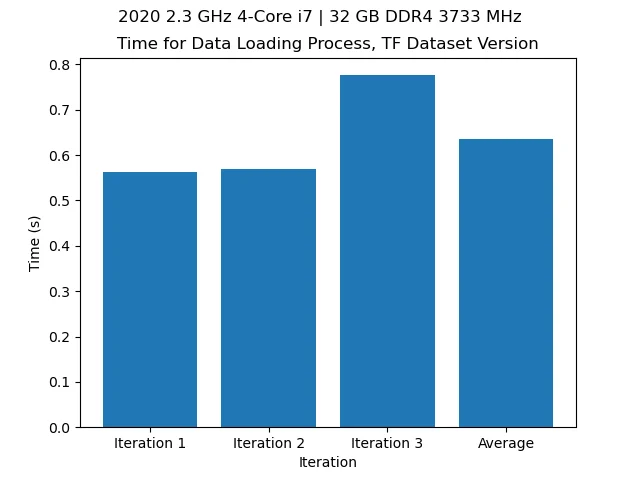
On top of that, with the new process, this process takes less than a second.
With this, we acn calculate the reduction precentage and efficiency factors using the following formulae: \[{\rm Reduction\ \%} = \frac{r_{\rm i}-r_{\rm f}}{r_{\rm i}}\times 100\]
where \(r_{\rm i}\) is the initial RAM usage and \(r_{\rm f}\) is the final RAM usage. For the efficiency factor, \[{\rm Efficiency\ Factor} = \frac{r_{\rm i}}{r_{\rm f}}\]
We can use the same formulae for the time. Plugging in our initial values of about 16GB and 160s to 0.4GB and 0.65s (roughly speaking) we see a reduction in the RAM usage by 97.5%, and an efficiency factor of 40, meaning our process is now 40x more memory efficient. Likewise, with the time (speed), we see a 99.59% reduction in process completion, now being 246.15x faster.
This goes to show the interal optimizations and efficiency involved when loading large data (like our ISS images) through Tensorflow Datasets. Without Tensorflow Datasets, the data loading is bottlenecked by having to load and store all the image data at one time before finally freeing the RAM.
While we did this change to load our data better and faster, this analysis was more for our own enjoyment, but despite that, I find it pretty insightful. For more information on Tensorflow Datasets, see Tensorflow’s website.
